
Redis has been around for many years and is widely used by both enterprises and individual developers.
Recent licensing changes have triggered a migration toward forks that remain fully open source and preserve the freedom to use, modify, and distribute the software without restrictions.
One of the most prominent forks is Valkey, which aims to be a drop-in replacement for existing Redis installations.
Most applications and services work without noticing any difference, while ensuring that the source code remains openly available.
Both Red Hat Enterprise Linux (RHEL) and its derivatives already include Valkey packages in their repositories, making installation straightforward.
Installing Valkey on RHEL
dnf install valkey

systemctl start valkey

systemctl enable valkey
Next, edit the configuration file located at:
/etc/valkey/valkey.conf
Add the following settings at the end of the file:
maxmemory 2048mb
# This should be 50% of the available RAM on the node
maxmemory-policy allkeys-lru
Restart the service to apply the changes:
systemctl restart valkey
We can test whether the server is running:
valkey-cli pingInstalling the PHP Extension for WordPress
To integrate Valkey with PHP-based applications such as WordPress, you will need the appropriate PHP extension.
This package is available from the popular Remi PHP repository.
dnf install php-pecl-redis6
After installation, restart PHP-FPM so the extension becomes available to local PHP processes:
systemctl restart php-fpm
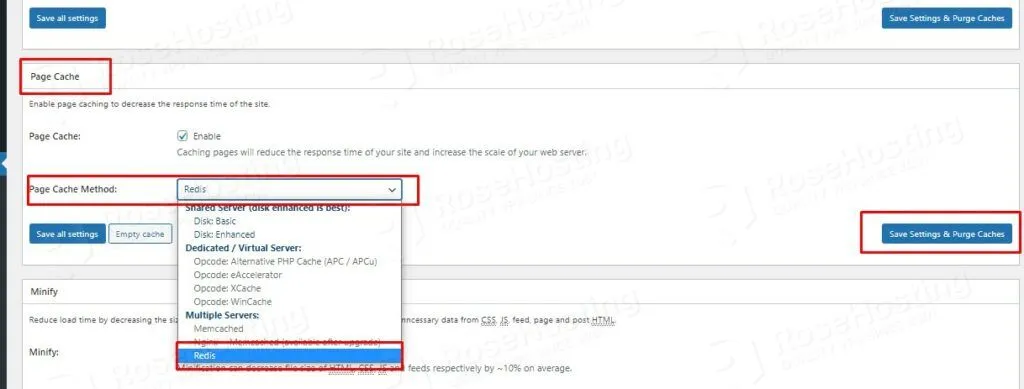
Once the extension is enabled, you can configure any Redis-compatible cache backend in W3 Total Cache to use Valkey.
Performance Testing and Results
After configuration, stress testing can be used to verify that cached objects remain in memory and that response times improve under load.
While Valkey may not always outperform every alternative caching solution, it provides a reliable and fully open-source option that is easy to deploy on existing Redis-compatible environments.