Tag: wordpress

  • How to Fix robots.txt 404 Errors in WordPress with Nginx

    How to Fix robots.txt 404 Errors in WordPress with Nginx

    I stumbled upon this problem this week, and I think it needs to be easily searchable, so I’ll copy-paste this original text:

    While working on my new site for an online printing service I encountered a strange problem. I was wondering about the Google Search Console complaining that the robots.txt is throwing a 404. But I could see the correct content in the browser! The following was kind of unexpected.

    While setting up Nginx I followed various guides on the web — but was primarily inspired by https://codex.wordpress.org/Nginx, which suggested this configuration:

    location = /robots.txt {
    allow all;
    log_not_found off;
    access_log off;
    }

    Looks nice, right? Everyone can access it and no spamming the logs.

    Wrong.

    The problem is based on my situation in that I was having PHP generate the robots.txt on demand. I’ve installed a very nice plugin called “XML Sitemap & Google News feeds” which does all the heavy lifting for me. This also means that there is no physical robots.txt file.

    Now, when accessing the robots.txt thru Nginx, the config rule is looking for that specific location. It can’t find the file and sets the HTTP status code 404, but only one moment later the next fallback rule kicks in, generating the content. This resulted in me being able to see the correct content, but also getting a 404. Finally Google Bot stopped at seeing the 404 and did not even try to read the content. Damn.

    The solution was quite easy — at least when you see it. Thanks to this article, I could finally end my headaches. It suggests this snippet for my situation:

    location = /robots.txt {
    try_files $uri $uri/ /index.php?$args;
    access_log off;
    log_not_found off;
    }

    Yeah, you just have to add a try_files directive, so that Nginx will at least try to ask PHP for a solution before giving up, throwing the towel into the ring.

    You can find the source by clicking here.

  • How to Replace Redis with Valkey on RHEL and WordPress Using W3 Total Cache

    How to Replace Redis with Valkey on RHEL and WordPress Using W3 Total Cache

    Redis has been around for many years and is widely used by both enterprises and individual developers.
    Recent licensing changes have triggered a migration toward forks that remain fully open source and preserve the freedom to use, modify, and distribute the software without restrictions.

    One of the most prominent forks is Valkey, which aims to be a drop-in replacement for existing Redis installations.
    Most applications and services work without noticing any difference, while ensuring that the source code remains openly available.

    Both Red Hat Enterprise Linux (RHEL) and its derivatives already include Valkey packages in their repositories, making installation straightforward.

    Installing Valkey on RHEL

    dnf install valkey
    
    systemctl start valkey
    
    systemctl enable valkey
    

    Next, edit the configuration file located at:

    /etc/valkey/valkey.conf
    

    Add the following settings at the end of the file:

    maxmemory 2048mb
    # This should be 50% of the available RAM on the node
    maxmemory-policy allkeys-lru
    

    Restart the service to apply the changes:

    systemctl restart valkey

    We can test whether the server is running:

    valkey-cli ping

    Installing the PHP Extension for WordPress

    To integrate Valkey with PHP-based applications such as WordPress, you will need the appropriate PHP extension.
    This package is available from the popular Remi PHP repository.

    dnf install php-pecl-redis6
    

    After installation, restart PHP-FPM so the extension becomes available to local PHP processes:

    systemctl restart php-fpm
    

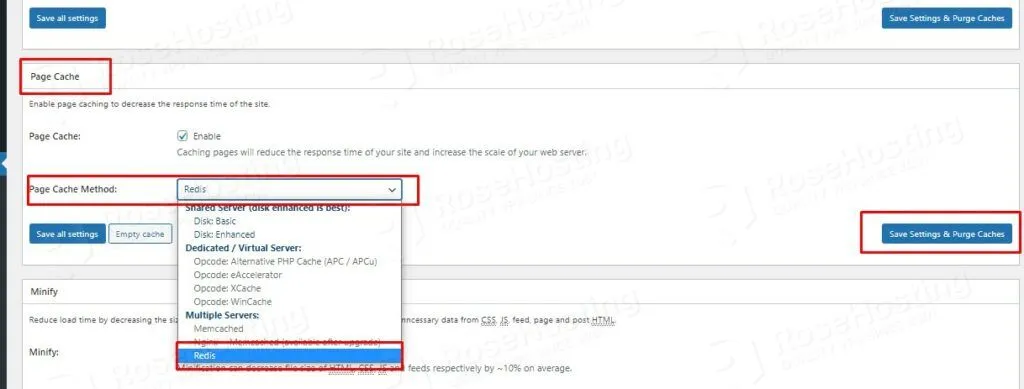
    Once the extension is enabled, you can configure any Redis-compatible cache backend in W3 Total Cache to use Valkey.

    w3 total cache plugin with redis
    w3 total cache plugin with redis

    Performance Testing and Results

    After configuration, stress testing can be used to verify that cached objects remain in memory and that response times improve under load.

    While Valkey may not always outperform every alternative caching solution, it provides a reliable and fully open-source option that is easy to deploy on existing Redis-compatible environments.